daftar menu run windows
Berikut adalah Daftar menu run di windows :
Fungsi
|
Perintah
|
Program/System
Settings Name
|
Run
Command
|
Open
documents folder
|
documents
|
Open
Videos folder
|
videos
|
Open
Downloads Folder
|
downloads
|
Open
Favorites Folder
|
favorites
|
Open
Recent Folder
|
recent
|
Log
off from Windows
|
logoff
|
Open
Pictures Folder
|
pictures
|
Windows
Sideshow
|
control.exe
/name Microsoft.WindowsSideshow
|
Windows
CardSpace
|
control.exe
/name Microsoft.cardspace
|
Windows
Anytime Upgrade
|
WindowsAnytimeUpgradeui
|
Taskbar
and Start Menu
|
control.exe
/name Microsoft.TaskbarandStartMenu
|
Troubleshooting
|
control.exe
/name Microsoft.Troubleshooting
|
User
Accounts
|
control.exe
/name Microsoft.UserAccounts
|
Adding
a new Device
|
devicepairingwizard
|
Add
Hardware Wizard
|
hdwwiz
– hdwwiz.cpl
|
Administrative
tools
|
Control
admintools
|
Advanced
User Accounts
|
netplwiz
|
Authorization
Manager
|
azman.msc
|
Backup
and Restore
|
sdclt
|
Bluetooth
File Transfer
|
fsquirt
|
Calculator
|
calc
|
Certificates
|
certmgr.msc
|
Change
Computer Performance Settings
|
systempropertiesperformance
|
Change
Data Execution Prevention Settings
|
systempropertiesdataexecutionprevention
|
Change
Printer Settings
|
printui
|
Character
Map
|
charmap
|
Check
disk utility
|
chkdsk
|
ClearType
Tuner
|
cttune
|
Color
Management
|
colorcpl
|
Command
Prompt
|
cmd
|
Compare
file
|
Comp
|
Component
Services
|
comexp.msc
|
Component
Services
|
Dcomcnfg
|
Computer
Management
|
compmgmt.msc
|
Computer
Management
|
compmgmtlauncher
|
Connect
to a Network Projector
|
Netproj
|
Connect
to a Projector
|
Displayswitch
|
Contact
|
wab
|
Control
Panel
|
Control
|
Create
A Shared Folder Wizard
|
Shrpubw
|
Create
a System Repair Disc
|
Recdisc
|
Credential
Backup and Restore Wizard
|
Credwiz
|
C:
drive
|
C:
|
Data
Execution Prevention
|
systempropertiesdataexecutionprevention
|
Date
and Time
|
timedate.cpl
|
Default
Location
|
locationnotifications
|
Device
Manager
|
devmgmt.msc
|
Device
Manager
|
hdwwiz.cpl
|
Device
Pairing Wizard
|
devicepairingwizard
|
Device
printers
|
Control
printers
|
Diagnostics
Troubleshooting Wizard
|
Msdt
|
Digitizer
Calibration Tool
|
Tabcal
|
DirectX
Diagnostic Tool
|
Dxdiag
|
Disk
Cleanup
|
Cleanmgr
|
Disk
Defragmenter
|
Dfrgui
|
Disk
Management
|
diskmgmt.msc
|
Display
|
Dpiscaling
|
Display
Color Calibration
|
Dccw
|
Display
Switch
|
Displayswitch
|
Display
properties
|
Control
desktop
|
Display
properties(w/appearance tab preselected
|
Control
color
|
DPAPI
Key Migration Wizard
|
Dpapimig
|
Driver
Verifier Manager
|
Verifier
|
Ease
of Access Center
|
Utilman
|
EFS
REKEY Wizard
|
Rekeywiz
|
Encrypting
File System Wizard
|
Rekeywiz
|
Event
Viewer
|
eventvwr.msc
|
Fax
Cover Page Editor
|
Fxscover
|
File
Signature Verification
|
Sigverif
|
Ftp
system
|
ftp
|
Font
windows
|
fonts
|
Font
Viewer
|
Fontview
|
Folder
options
|
Control
folders
|
Game
Controllers
|
joy.cpl
|
Getting
Started
|
Gettingstarted
|
IExpress
Wizard
|
Iexpress
|
Infrared
|
irprops.cpl
|
Install
or Uninstall Display Languages
|
Lusrmgr
|
Internet
Explorer
|
Iexplore
|
Internet
Options
|
inetcpl.cpl
|
Import
to win contact
|
wabmig
|
iSCSI
Initiator Configuration Tool
|
Iscsicpl
|
iSCSI
Initiator Properties
|
Iscsicpl
|
Ip
configuration
|
Ipconfig
|
Ip
configuration (DNS cache contents)
|
Ipconfig
/displaydns
|
Ip
configuration (delete DNS cache contents)
|
Ipconfig
/flushdns
|
Ip
configuration (release all connections)
|
Ipconfig
/release
|
Ip
configuration (renew all connections)
|
Ipconfig
/renew
|
Ip
configuratin (refrest DHCP & re-registered DNS)
|
Ipconfig
/registerdns
|
Ip
configuration (display DHCP class ID)
|
Ipconfig
/showclassid
|
Ip
configuration (modifies DHCP class ID)
|
Ipconfig
/setclassid
|
Keyboard
properties
|
Control
keyboard
|
Label.exe
|
Label
|
Language
Pack Installer
|
Lpksetup
|
Local
Group Policy Editor
|
gpedit.msc
|
Local
Security Policy
|
secpol.msc
|
Local
Users and Groups
|
lusrmgr.msc
|
Location
Activity
|
locationnotifications
|
Magnifier
|
Magnify
|
Malicious
Software Removal Tool
|
Mrt
|
Manage
Your File Encryption Certificates
|
Rekeywiz
|
Math
Input Panel
|
Mip
|
Microsoft
diskpart
|
diskpart
|
Microsoft
Management Console
|
Mmc
|
Microsoft
Support Diagnostic Tool
|
Msdt
|
Mouse
|
main.cpl
– control mouse
|
MS-dos
FTP
|
ftp
|
NAP
Client Configuration
|
napclcfg.msc
|
Narrator
|
Narrator
|
Network
Connections
|
ncpa.cpl
– control netconnections
|
New
Scan Wizard
|
Wiaacmgr
|
Notepad
|
Notepad
|
ODBC
Data Source Administrator
|
odbcad32
|
ODBC
Driver Configuration
|
Odbcconf
|
On-Screen
Keyboard
|
Osk
|
Paint
|
Mspaint
- pbrush
|
Personalization
|
Control
desktop
|
Pen
and Touch
|
tabletpc.cpl
|
People
Near Me
|
collab.cpl
|
Performance
Monitor
|
perfmon.msc
|
Performance
Options
|
systempropertiesperformance
|
Phone
and Modem
|
telephon.cpl
|
Phone
Dialer
|
Dialer
|
Power
Options
|
powercfg.cpl
|
Presentation
Settings
|
presentationsettings
|
Print
Management
|
printmanagement.msc
|
Printer
Migration
|
Printbrmui
|
Printer
User Interface
|
Printui
|
Private
Character Editor
|
Eudcedit
|
Problem
Steps Recorder
|
Psr
|
Programs
and Features
|
appwiz.cpl
|
Protected
Content Migration
|
Dpapimig
|
Region
and Language
|
intl.cpl
|
Registry
Editor
|
Regedit
|
Registry
Editor
|
regedit32
|
Remote
Access Phonebook
|
Rasphone
|
Remote
Desktop Connection
|
Mstsc
|
Resource
Monitor
|
Resmon
|
Resource
Monitor
|
perfmon
/res
|
Resultant
Set of Policy
|
rsop.msc
|
SAM
Lock Tool
|
Syskey
|
Screen
Resolution
|
desk.cpl
|
Securing
the Windows Account Database
|
Syskey
|
Services
|
services.msc
|
Set
Program Access and Computer Defaults
|
computerdefaults
|
Share
Creation Wizard
|
Shrpubw
|
Shared
Folders
|
fsmgmt.msc
|
Shutdown
windows
|
Shutdown
|
Snipping
Tool
|
Snippingtool
|
Sound
|
mmsys.cpl
|
Sound
Recorder
|
Soundrecorder
|
SQL
Server Client Network Utility
|
Cliconfg
|
Sticky
Notes
|
Stikynot
|
Stored
User Names and Passwords
|
Credwiz
|
Sync
Center
|
Mobsync
|
System
Configuration
|
Msconfig
|
System
Configuration Editor
|
Sysedit
|
System
file checker utility (scan imediately)
|
Sfc
/scannow
|
System
file checker utility (scan once at next boot)
|
Sfc
/scanonce
|
System
file checker utility (scan on every boot)
|
Sfc
/scanvoot
|
System
file checker utility (return to default settings)
|
Sfc
/revert
|
System
checker utility (file purge file cache)
|
Sfc
/purgecache
|
System
checker utility (set cache size to size x)
|
Sfc
/cachesize=x
|
System
Information
|
msinfo32
|
System
Properties
|
sysdm.cpl
|
System
Properties (Advanced Tab)
|
systempropertiesadvanced
|
System
Properties (Computer Name Tab)
|
systempropertiescomputername
|
System
Properties (Hardware Tab)
|
systempropertieshardware
|
System
Properties (Remote Tab)
|
systempropertiesremote
|
System
Properties (System Protection Tab)
|
systempropertiesprotection
|
System
Restore
|
rstrui
|
Tablet
PC Input Panel
|
tabtip
|
Task
Manager
|
taskmgr
|
Task
Scheduler
|
taskschd.msc
– control schedtask
|
Trusted
Platform Module (TPM) Management
|
tpm.msc
|
User
Account Control Settings
|
useraccountcontrolsettings
|
Utility
Manager
|
utilman
|
Version
Reporter Applet
|
winver
|
Volume
Mixer
|
sndvol
|
Volume
serial number for
|
c:
label
|
Windows
Action Center
|
wscui.cpl
|
Windows
Activation Client
|
slui
|
Windows
Anytime Upgrade Results
|
windowsanytimeupgraderesults
|
Windows
CardSpace
|
infocardcpl.cpl
|
Windows
color and appereance
|
Control
color
|
Windows
Disc Image Burning Tool
|
isoburn
|
Windows
DVD Maker
|
dvdmaker
|
Windows
Easy Transfer
|
migwiz
|
Windows
Explorer
|
explorer
|
Windows
Fax and Scan
|
wfs
|
Windows
Features
|
optionalfeatures
|
Windows
Firewall
|
firewall.cpl
|
Windows
Firewall with Advanced Security
|
wf.msc
|
Windows
Installer
|
msiexec
|
Windows
Journal
|
journal
|
Windows
Media Player
|
Dvdplay
– wmplayer
|
Windows
Media Player
|
wmplayer
|
Windows
Memory Diagnostic Scheduler
|
mdsched
|
Windows
Mobility Center
|
mblctr
|
Windows
Picture Acquisition Wizard
|
wiaacmgr
|
Windows
PowerShell
|
powershell
|
powershell_ise
|
|
Windows
Remote Assistance
|
msra
|
Windows
Repair Disc
|
recdisc
|
Windows
Script Host
|
wscript
|
Windows
Update
|
wuapp
|
Windows
Update Standalone Installer
|
wusa
|
Windows
Version
|
winver
|
WMI
Management
|
wmimgmt.msc
|
WordPad
|
write
|
XPS
Viewer
|
xpsrchvw
|
Tekan tombol windows + r lalu masukan menu run tersebut..
sekian semoga ber manfaat :)
sekian semoga ber manfaat :)
Tag :
windows
instalasi tanpa partition recerved
Assalamu'allaikum Wr.Wb
kali ini saya sekedar shating saja tentang pengalaman saya mengenai instalasi windows 8 tanpa parition reserved
dan berikut langkah-langkahnya..
1. masukan cd win 8 nya, atau fd tancepin fdnya lalu booting lewat dvdrom/usb fd nya.. (hal umum lah, pasti agan semua udah pada tau)
2. tunggu loadingnya sampai nampil di layar kaya di bawah ini.
 3.setelah muncul tampilan kaya gitu, jangan dulu di next, tekan tombol shift + f10 lalu akan muncul cmd.
4.ketik "diskpart" enter.

5.setelah mauk ke program diskpartnya lihat daftar disk yang terpasang di komputernya dengan memasukan perintah "list disk", enter. dan di bawah ini adalah contoh harddisk yang masih kosong atau belum terpartisi.
 6. lalu pilih disk yang akan di partisi, contoh "select disk 0", enter.
 7. lalu partisi hardisk tersebut dengan perintah "create partition primary" dengan di ikuti "size" untuk memaukan jumpah kapasitas partisi dalam ukuran mb. contohnya saya akan membuat partisi dengan kapasitas 20GB maka perintah nya adalah "create partition primary size=20000"
 8. "active" untuk mengaktifkan partisi tersebut
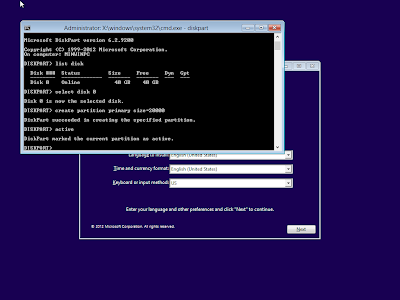 .9. "exit" dan close cmd nya, dan lanjutkan instalasi windows seperti biasa. :)
untuk partisi ke dua bisa di lakukan di saat instalasi windows, atau di saat windows 8 sudah terinstall, dgn software, atau mungkin anda sendiri punya cara lain..
yang pasti itulah salah satu cara instalasi windows tanpa partisi recerved..
semoga bermanfaat :D....
Wassalamu'allaikum Wr.Wb
kali ini saya sekedar shating saja tentang pengalaman saya mengenai instalasi windows 8 tanpa parition reserved
dan berikut langkah-langkahnya..
1. masukan cd win 8 nya, atau fd tancepin fdnya lalu booting lewat dvdrom/usb fd nya.. (hal umum lah, pasti agan semua udah pada tau)
2. tunggu loadingnya sampai nampil di layar kaya di bawah ini.

4.ketik "diskpart" enter.

5.setelah mauk ke program diskpartnya lihat daftar disk yang terpasang di komputernya dengan memasukan perintah "list disk", enter. dan di bawah ini adalah contoh harddisk yang masih kosong atau belum terpartisi.


untuk partisi ke dua bisa di lakukan di saat instalasi windows, atau di saat windows 8 sudah terinstall, dgn software, atau mungkin anda sendiri punya cara lain..
yang pasti itulah salah satu cara instalasi windows tanpa partisi recerved..
semoga bermanfaat :D....
Wassalamu'allaikum Wr.Wb
Tag :
tips dan trik
,
windows


